Automated Email List Validation: Why a Once-a-Year Clean Still Leaves Your Sender Reputation Exposed
An email verification result only describes the address at the time it was checked. It may have been able to receive mail then, but that does not guarantee it will remain valid.
Google advises senders to keep their user-reported spam rate below 0.10% and to avoid reaching 0.30%. A list can deteriorate soon after it has been cleaned. If an address becomes invalid afterward, it may still receive campaign emails until the next check. Verification can identify technical problems, including non-working mailboxes, typing mistakes, and risky domains. It cannot replace permission from people who have agreed to receive your emails. Automated checks are usually most useful for large lists, imported contacts, and audiences that are emailed infrequently. A small list of confirmed subscribers contacted every week may be manageable without them.
Instead of asking only whether your email list is clean, ask how long a faulty address could remain on it before you discover the problem.
If you clean your list twice a year, an address that stops working just after a cleanup could remain for months. Campaigns sent during that period may reach it repeatedly, while bounce and complaint rates rise without an obvious explanation.
What Is Automated Email List Validation?
Automated validation connects your list to a verification service that checks addresses again on a schedule. It removes the need to export contacts, submit them to a tool, and manually import the results every time.
There are three main approaches, each designed to catch a different kind of problem:
| Method | When it happens | What it's good for |
|---|---|---|
| Real-time | When someone submits a form or an API request is made | Preventing invalid addresses from entering your list |
| Bulk | When you upload a contact file | Cleaning older records or contacts imported from another source |
| Scheduled | Automatically at recurring intervals | Detecting addresses that become invalid after they were added |
A comprehensive process can combine all three. Real-time checks screen new entries, bulk verification helps clean existing data, and scheduled checks look for changes over time.
Why Do Email Lists Decay?
Email addresses do not all become invalid after a predictable amount of time. They can become less useful as people's circumstances and online habits change. Common reasons include:
- Job changes. Employees may leave a company, after which their former work mailbox is closed or no longer maintained. Government employment data indicates that people typically spend only a few years with one employer, so business contact details can become outdated.
- Neglected personal inboxes. Someone may keep an old personal account but stop checking it. Messages can still be accepted even though the owner is unlikely to read them.
- Expired domains. A small business might shut down or fail to renew its domain, making addresses tied to it unusable.
- Poor-quality signup data. Typing errors and temporary throwaway addresses may be invalid or unsuitable from the moment they are collected.
You may find different estimates of annual list decay, but they are based on different datasets and methods, and there is no universally accepted benchmark. Treat those figures as an indication of the trend rather than an exact prediction. The general lesson is that contact data becomes less reliable when it is left unattended.
How Often Should You Validate Your List?
There is no schedule that guarantees safety. Inbox providers assess sending behaviour and abuse signals on their own terms, not according to your marketing calendar.
Anti-abuse organisations such as Spamhaus have noted that addresses with no engagement over periods ranging from a few months to a year may draw attention. Many teams run a cleanup every six or twelve months, which can leave a long gap between checks.
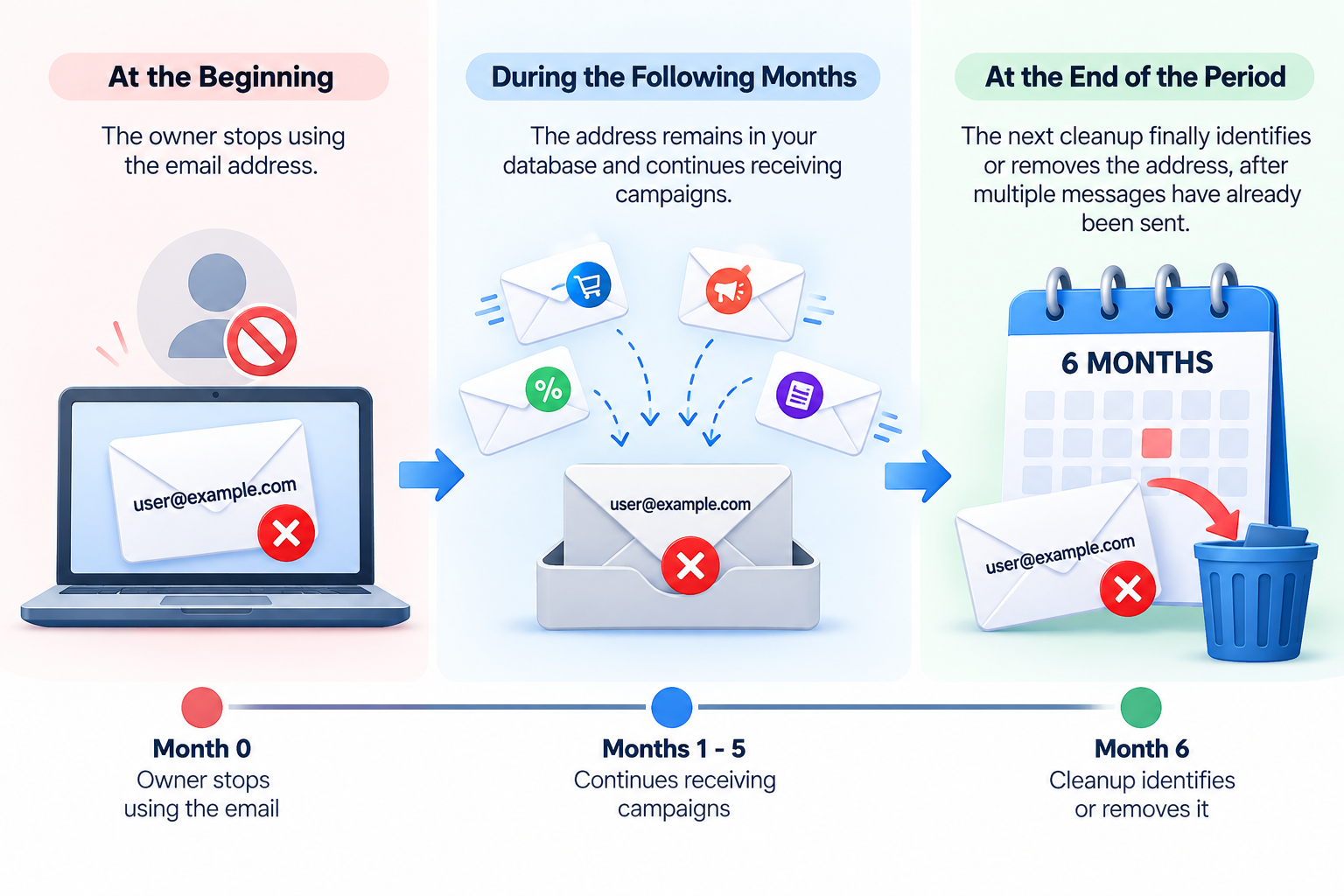
Consider what can happen to one mailbox during a six-month period:
At the beginning: its owner stops using it. During the following months: the address remains in your database and continues receiving campaigns. At the end of the period: the next cleanup finally identifies or removes it, after multiple messages have already been sent.
Use the following as a starting point and adapt it to your audience and sending habits:
| Your list | Suggested starting point |
|---|---|
| Small list of confirmed subscribers, emailed weekly | Use your email platform's existing bounce-handling features |
| Large list, emailed monthly | Verify before important campaigns and consider scheduled checks |
| Segments contacted only a few times per year | Verify shortly before each send |
| Imported or acquired list | Run a full bulk check, then continue monitoring |
| List not contacted for more than a year | Verify the addresses and obtain permission again before sending |
What Does Email Verification Actually Check?
An email verifier can assess an address without sending it a regular email. Checks generally move from basic formatting to more involved technical tests:
- Syntax. The service checks whether the address follows the expected format, catching issues such as a missing “@” symbol or obvious typing errors.
- Domain and MX records. It checks whether the domain exists and has mail-server records configured. Without suitable mail servers, messages cannot be delivered to that domain.
- SMTP check. The verifier starts a short exchange with the recipient's mail server to assess whether the mailbox appears to exist, then ends the exchange without sending message content.
- Classification. The address may be labelled as disposable, role-based (for example, admin@ or info@), or otherwise risky.
This final classification is important because an address marked “deliverable” is not automatically safe to email. A disposable mailbox may work briefly and then disappear. Role-based addresses can pass basic checks but may be more likely to lead to complaints; some role mailboxes may also fall into spam-trap categories.
Where Verification Falls Short
Verification can reduce risk, but it cannot remove every source of risk.
Catch-all domains. These domains accept mail for many or all addresses, so a verifier may be unable to confirm whether one particular mailbox exists. Be wary of services that promise certainty in every case. You can assign these contacts a separate risk category and send to them in smaller batches while monitoring results. Pristine spam traps. These addresses were not originally used by real people but may still accept mail, allowing them to pass technical checks. Good collection practices offer better protection: use confirmed signups and avoid purchased or scraped lists. Consent and interest. A technically valid address only indicates that a message may be delivered. It does not mean the recipient wants it. A spam complaint from a valid address can be more damaging than a bounce. Age of the result. Verification findings apply to a particular date. As time passes, they become a less reliable guide to the address's current status.
Benefits of Automating Validation
| Benefit | What it means for you |
|---|---|
| More stable bounce and spam rates | Identify and suppress problematic addresses before sending rather than reacting after issues occur |
| Lower exposure to spam traps | Flag abandoned or risky addresses earlier where the checks can detect them |
| More meaningful metrics | Avoid having performance figures skewed by addresses that nobody monitors |
| Less repetitive work | Reduce the recurring export, upload, and re-import process |
| Fewer missed cleanups | Run checks on a schedule instead of relying on someone to remember |
Consider the order of events when a message bounces. The sending platform records the failure, your sender reputation may be affected, and the address is then suppressed. Checking addresses before a campaign can move that decision earlier in the process.
Metrics still need context. Removing inactive or invalid contacts may change your percentages, but it does not automatically improve your content or audience. Assess the program using deliverability and meaningful replies, rather than treating a higher open rate as proof of success.
Which Sender Rules Does List Hygiene Touch?
| Provider | What to know |
|---|---|
| Google (Gmail) | Keep the user-reported spam rate below 0.10% and avoid reaching 0.30%. Larger senders also need SPF, DKIM, and DMARC authentication, as well as a one-click unsubscribe option. |
| Microsoft (Outlook.com) | From May 2025, senders sending 5,000 or more messages per day must meet SPF, DKIM, and DMARC requirements or their messages may be routed to junk. |
Authentication and list quality address different problems, but both matter. Correct DNS records alone cannot make an email campaign successful if it targets invalid addresses or people who do not want the messages.
On billing. Some marketers say that invalid contacts increase their email costs, but the impact depends on the platform. For example, Mailchimp excludes cleaned addresses from its audience count, so the cost may come from the bounce rather than from the subscription fee. Check your own provider's billing policy before making a claim about savings.
Manual Cleaning or Automation: Which Do You Need?
Cleaning by hand may be enough if:
Your list is relatively small and subscribers confirmed their signups. You send emails regularly, allowing bounce problems to surface quickly. Your sending volume is well below provider thresholds.
Automation is worth considering if:
Your list is large, imported, or assembled from multiple systems. Some audience segments receive messages only a few times per year. You send high volumes to Gmail and Outlook.com addresses. Your team cannot reliably keep up with a manual cleaning schedule.
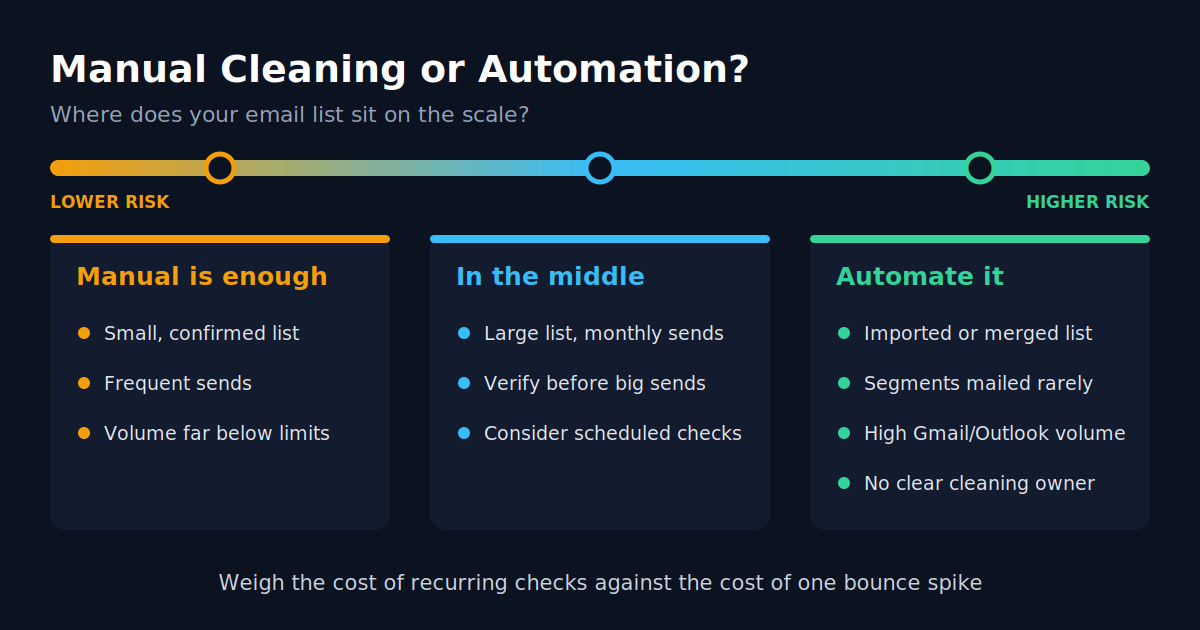
Whichever approach you choose, compare the actual costs. Put the price of recurring verification beside the potential impact of a major bounce spike, including poorer inbox placement and the time it may take to recover.
How to Set Up Automated Validation
- Connect your list. Link your email platform or CRM to the verification service, or connect through its API.
- Set your thresholds. Decide how your process will handle risky, role-based, and catch-all addresses. Stricter rules can exclude more questionable contacts, but may also remove some legitimate ones.
- Send results back to your platform. Configure invalid addresses to be suppressed or tagged automatically in your sending system.
- Test with a small segment. Choose a group where a limited test is acceptable, compare its next bounce rate with the previous campaign, and adjust your rules as needed.
- Check addresses at signup. Stopping invalid contacts at the point of entry is often easier than cleaning them up later.
Where to Start
Automation is not useful simply because manual cleaning takes effort. Its value is in reducing the period during which a list can change without being checked. When you only clean whenever time allows, invalid contacts can remain in circulation between checks, and inbox providers determine how that affects your sending.
Small list, confirmed subscribers, weekly emails? Your platform's built-in bounce handling may be sufficient. Imported list, occasional sends, or high volume? Verify the full list first to understand its condition, then decide whether regular checks cost less than the likely impact of a future bounce problem.
Whichever route you take, pair verification with responsible list-building. Verification helps identify addresses that may no longer work; consent helps ensure you are not sending unwanted email.