Managing Your Bouncify Subscriptions
This guide provides a comprehensive overview of how to manage your subscriptions in the bouncify app.
My Subscriptions Overview
The "My Subscriptions" page provides a summary of your active and past subscriptions. From here, you can view key details about your subscription plans at a glance.

The following information is available on the overview page:
- Status: Indicates whether your subscription is currently
ActiveorInactive. - Plan: The name of your subscription plan (e.g.,
15K SUBS). - Credits: The number of credits available in your plan.
- Amount: The cost of your subscription.
- Billing Cycle: The frequency of your billing (e.g.,
Monthly). - Started: The date your subscription began.
- Next Billing: The date of your next scheduled payment.
- Actions: Allows you to
Cancelyour subscription. - Info: A link to view more detailed information about your subscription.
Subscription Details
To view more detailed information about a specific subscription, click the info icon (>). This will take you to the "Subscription Details" page.
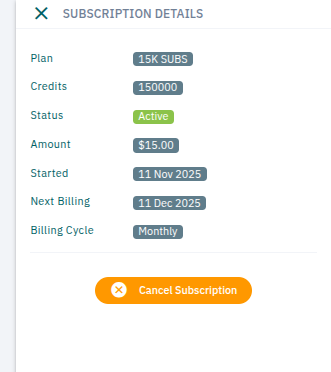
This view provides a more detailed breakdown of your subscription, including:
- Plan:
15K SUBS - Credits:
150000 - Status:
Active - Amount:
$15.00 - Started:
11 Nov 2025 - Next Billing:
11 Dec 2025 - Billing Cycle:
Monthly
How to Cancel Your Subscription
You can cancel your subscription at any time from the "Subscription Details" page.
- Navigate to the My Subscriptions page.
- Click the info icon (
>) for the subscription you wish to cancel. - Click the Cancel Subscription button.
Please note that when you cancel your subscription, it will remain active until the end of the current billing cycle. You will not be charged for the next cycle.