Bouncify Affiliate Program
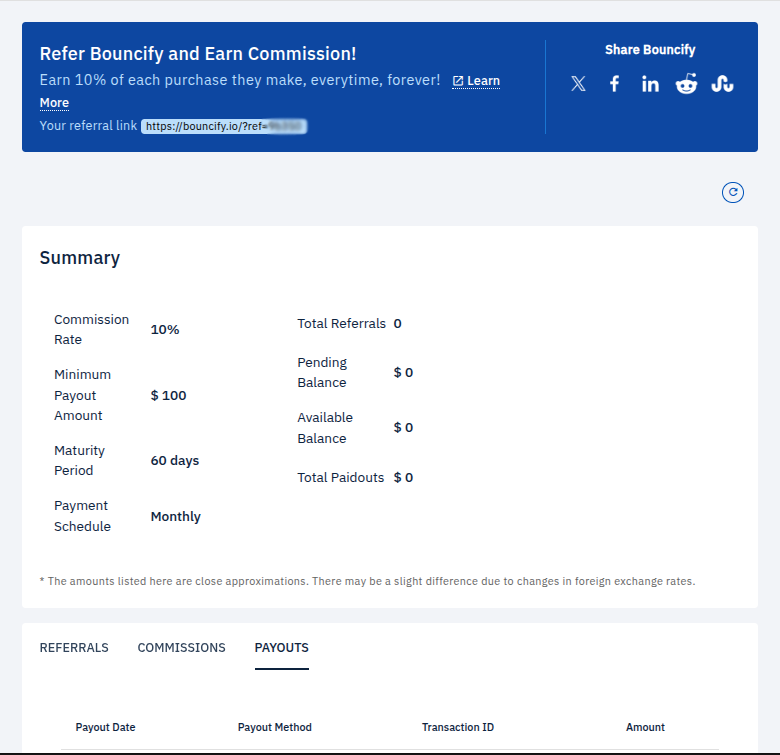
Welcome to the Bouncify Affiliate Program! Our program is designed to reward you for spreading the word about our services. Earn a commission for every purchase made by users who sign up through your referral link. This guide will walk you through the affiliate dashboard and explain how you can track your earnings and manage your referrals.
Getting Started
To get started, simply share your unique referral link with your audience. You can find your referral link at the top of the affiliate dashboard.
- Your referral link:
https://bouncify.io/?ref=xxxxx
You can share this link on your website, blog, social media channels, or directly with individuals you think would benefit from Bouncify's services.
Summary Dashboard
The summary section of your dashboard provides a quick overview of your affiliate account. Here's a breakdown of what each metric means:
| Metric | Description |
|---|---|
| Commission Rate | The percentage of each sale you earn as a commission. Currently 10%. |
| Minimum Payout | The minimum balance required before you can request a payout. Currently $100. |
| Maturity Period | The time it takes for a commission to be approved. Currently 60 days. |
| Payment Schedule | Payouts are processed Monthly. |
| Total Referrals | The total number of users who have signed up through your link. |
| Pending Balance | Commissions that are currently in the maturity period. |
| Available Balance | The amount available for payout. |
| Total Payouts | The total amount of commissions you have been paid to date. |
The amounts listed in your dashboard are close approximations. There may be a slight difference due to changes in foreign exchange rates.
Referrals, Commissions, and Payouts
The lower section of the dashboard is organized into three tabs, providing detailed information about your affiliate activity.
Referrals
This tab displays a list of all the users who have signed up using your referral link. You can track the status of each referral and see who has made a purchase.
| User | Type | Status | Signup At |
|---|---|---|---|
Commissions
Here you can view a detailed breakdown of all the commissions you have earned. Each entry includes the date, the amount, and the status of the commission (e.g., pending, approved).
| Date | Order | Amount | Commission | Percent | Type | Status |
|---|---|---|---|---|---|---|
Payouts
The Payouts tab shows a history of all the payouts you have received. For each payout, you can see the payout date, the method of payment, the transaction ID, and the amount.
| Payout Date | Payout Method | Transaction ID | Amount |
|---|---|---|---|
We are excited to have you as a partner and look forward to a successful collaboration. If you have any questions, please don't hesitate to reach out to our support team.